The LMS that finally does the work.
Dawn is the AI-native LMS for STEM academies. Everything your academy runs on, finally in one place.
Born at

Dawn is the system Rysera STEM runs on every day, from its courses and instructors to its branches and payments. Now we’re opening it to other academies.
Courses, people and money. One place.
Dawn was built inside a working STEM academy, so the everyday jobs are already handled: launching courses, staffing them, enrolling students and getting paid.
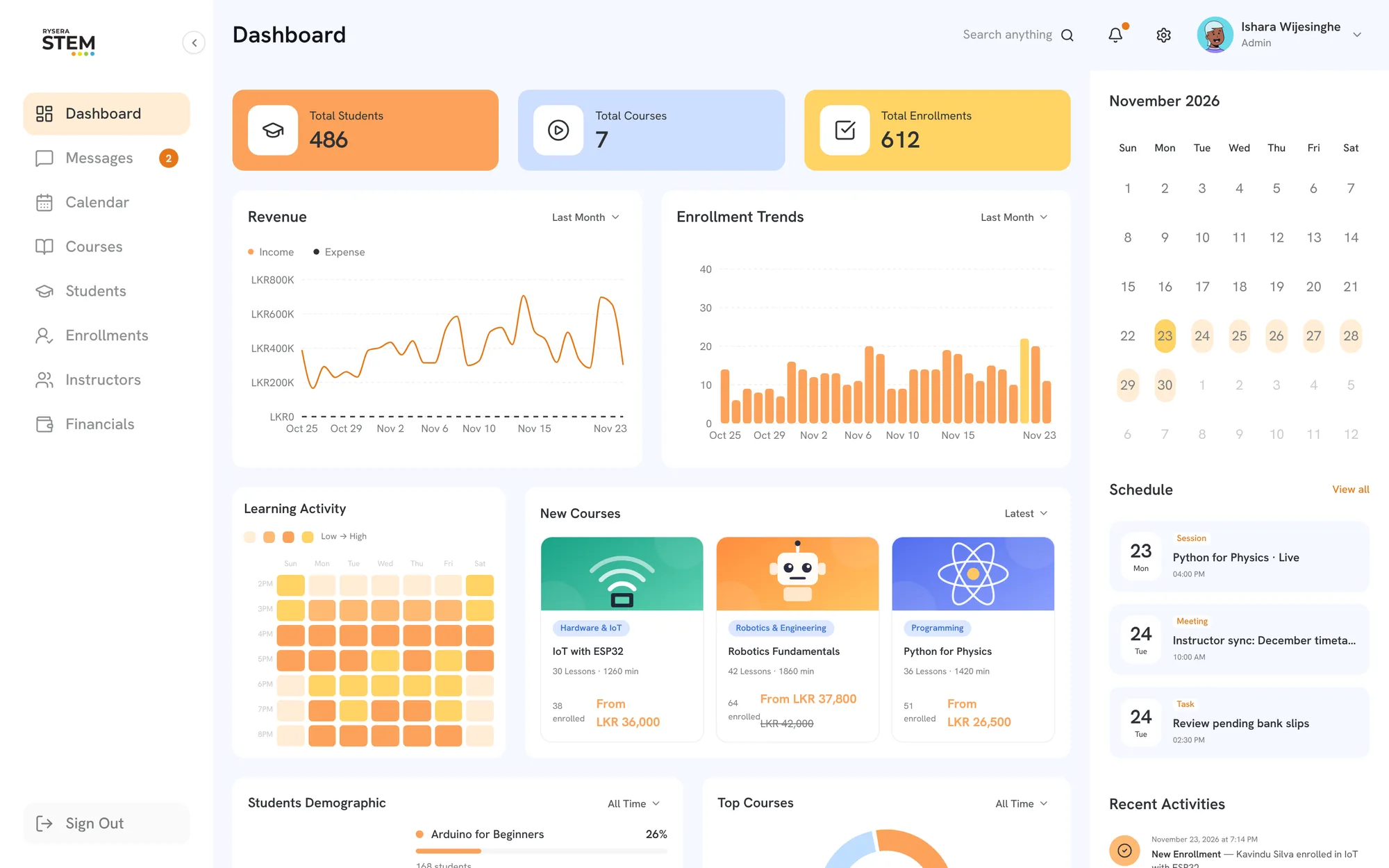
Revenue, enrollments, learning activity and the week’s schedule on one screen.
Your AI team, working inside your LMS.
Pick a ready-made agent, or connect agents into your own automations with the visual workflow builder. They do the follow-ups, the reports and the analysis, and your team stays in control.
Quiz follow-up
Ready-made workflow · fully editable
Quiz Analyst
Reads every submission, finds the concepts a student missed and explains them in plain words.
After every quiz
Report Writer
Writes progress reports for students, parents and admins, so nobody builds them by hand.
Every week
Student Success
Spots students falling behind and nudges them, and their instructor, before they drop off.
Daily
Tutor & Hints
Gives step-by-step hints on problems and code labs, without handing over the answer.
On request
Grading Assistant
Drafts scores and feedback on written answers for instructors to review and approve.
On submission
Ops Assistant
Follows up on pending payments, confirms enrollments and keeps class schedules tidy.
Always on
Example
AI analysis after every quiz.
The moment a student submits, the Quiz Analyst explains what went wrong, points to the exact lesson to revisit and builds a short practice set. The instructor gets the summary, not a pile of papers.
Get early accessQuiz · Module 1
Circuits & Ohm’s law
6/10
Submitted 2 min ago
AI analysisQuiz Analyst
Strong on circuit diagrams. The mistakes in Q3, Q8 and Q10 all come from rearranging V = IR. Two answers solved for resistance when the question asked for current.
Study next
Extend Dawn with plugins.
Plugins add new kinds of hands-on lessons to Dawn: circuit builders, microcontroller simulators and physics labs. Pick them from the marketplace, and your instructors get new tools without waiting for a new release.
- Install onceAdd a plugin for your whole academy in one click.
- Use it in any courseInstructors add it to a lesson like a video or a quiz.
- Graded and trackedStudent work counts towards progress and grades like every other lesson.
Blink an LED on pin 13
Wire an LED to pin 13 through a 220 Ω resistor, then write a sketch that switches it on and off every 500 ms. Watch the serial monitor to check your timing.
00:00:02.000LED on
00:00:02.500LED off
00:00:03.000LED on
00:00:03.500LED off
00:00:04.000LED on
LED wired to pin 13
Toggles every 500 ms
1/3
Plugin marketplace
- Install
Circuit Builder
by Dawn
Drag components onto a breadboard, wire them up and watch current flow.
ElectronicsPhysics - Installed
Arduino Simulator
by Dawn
Write sketches and run them on a virtual board, with a serial monitor.
RoboticsC++ - Install
ESP32 Simulator
by Dawn
Prototype IoT projects with Wi-Fi, sensors and GPIO in the browser.
IoTMicroPython - Install
Physics Lab
by Dawn
Simulations with variables students change: pendulums, motion, forces.
PhysicsSimulation
Need a plugin we don’t have yet? Tell us what your courses need
Everything a STEM course needs, built in.
No add-ons for the basics. Math, code and interactive lessons work out of the box in every course.
F = ma
∇ × E = −∂B∂t
\nabla \times E = -\frac{\partial B}{\partial t}
LaTeX math
Equations render natively in notes, quizzes and answers.
def current(v, r):
return v / r
print(current(9, 450))
0.02
5 / 5 tests passed
Code runner
Students write and run Python in the browser, with live output and auto-grading.
What limits the current in this circuit?
Interactive video
Questions pop up inside lesson videos, so students check understanding as they watch.
Question 4 · Written · Code
Return the resistance for a given voltage and current.
def resistance(v, i):
return v / i
Code answers in quizzes
Mix multiple-choice and written answers, including code, with timed attempts and answer review.
Connect the tools you already use.
Already on Google Workspace? No migration needed. Dawn plugs into your calendar, your drive and the channels your students actually read.
Google Calendar
Two-way sync for sessions, deadlines and meetings.
Google Meet
A Meet link is created automatically for every session.
Google Tasks
Tasks and deadlines land in students’ to-do lists.
Google sign-in
One-click login with existing Google accounts.
Google Drive
Notes, lab files and certificates saved to Drive.
Google Sheets
Gradebooks exported and kept up to date.
Google Classroom
Assignments and resources synced both ways.
Telegram
Announcements and alerts posted to your channel.
Reminders, payment confirmations and progress updates.
The whole toolkit, included.
Quizzes & grading
Timed attempts, manual grading and answer review.
Certificates
PDF certificates with a public verification link.
Built-in chat
Direct and group chats with files and reactions.
Broadcasts
Message a whole course or hand-picked students.
Course forums
Q&A threads with voting and moderation.
Calendar
Sessions, meetings, deadlines and personal tasks.
Notifications
In-app and email, with per-person preferences.
Analytics
Enrollment trends, top courses and learning activity.
Live sessions
Schedule classes with Meet links in one step.
Assignments
File submissions graded in one workspace.
Exports
Students, enrollments and transactions to CSV.
Roles & permissions
Every person sees exactly what they should.
One platform, three workspaces.
Academy owners
See the whole business at a glance.
- Revenue, enrollments and course performance
- Branches, batches and instructors in one view
- Approve payments without spreadsheets
Instructors
Teach, grade and talk to students in one place.
- Build lessons with labs, code and math
- Grade quizzes, code and submissions
- Message, broadcast and schedule sessions
Students
Learn by doing, not just watching.
- Interactive videos, code labs and simulations
- Progress, deadlines and sessions on one dashboard
- Certificates they can share and verify
Bring Dawn to your institution.
Early access is open to a small group of academies and institutions. Tell us how you run things today and what you need, and we’ll shape Dawn around it.
- 1
We read every request and get back to you within 2 business days.
- 2
A short call to understand your courses, branches and team.
- 3
Onboarding with your courses, instructors and students set up for you.